Très facile

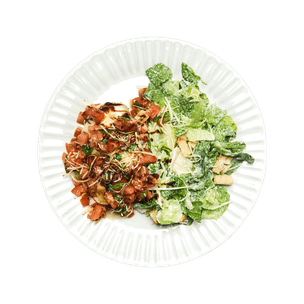
Bruschetta Chicken with Caesar Salad
7 minute
Préparation
30 minute
Cuisson
543 kcal
Par portion
Ingrédients pour 1

1
Poulet (escalope)

1/2
Tomate

1 brin
Basilic (frais)

1 càc
Crème balsamique

1 oz
Mozzarella (à cuire)

3.5 oz
Caesar Salad Kit
2 càs
Parmesan (shredded)
Ustensiles
Plaques de cuisson, Four, Couteau
recette
- Étape 1
Preheat the oven to 350ºF. Wash & small dice the tomato. Add the tomato to a mixing bowl. - Étape 2
Wash & finely chop the basil. Add the basil to the bowl with the tomato. - Étape 3
Thinly slice the mozzarella cheese & set it aside. - Étape 4
Add the parmesan cheese to the bowl. Season with salt, pepper & garlic powder. Add a generous drizzle of olive oil & stir to combine. Set aside. - Étape 5
Season the chicken breast with salt & pepper. - Étape 6
Heat a drizzle of olive oil in an oven-safe skillet on medium-high heat. Add the chicken & cook for 4-5 min on each side. Place the skillet in the oven & cook the chicken for another 12-15 min or until the chicken is fully cooked (165ºF internal temp). - Étape 7
Remove the chicken from the oven & top with the sliced mozzarella. Place back in the oven for 2-3 min or until the cheese is melted. - Étape 8
Meanwhile, add the contents of the caesar salad kit to a bowl & toss with the dressing. - Étape 9
Remove the chicken from the oven. Plate the chicken & caesar salad. Top the chicken with the bruschetta & drizzle the balsamic glaze over top. Serve & enjoy!